
JellyLMS
A Jellyfin plugin that bridges audio playback to Logitech Media Server (LMS) for multi-room synchronized playback.
Quick Install
Add the following repository URL to your Jellyfin server to install JellyLMS directly from the plugin catalog:
https://gitea.tourolle.paris/dtourolle/jellyLMS/raw/branch/master/manifest.json
Steps:
- Go to Dashboard → Plugins → Repositories
- Click Add and paste the URL above
- Go to Catalog and find "JellyLMS"
- Click Install and restart Jellyfin
Overview
JellyLMS enables Jellyfin to stream audio to LMS, which acts as a multi-room speaker system. The architecture is:
- Jellyfin owns the library, queue, and playback intent
- LMS owns synchronized audio delivery to players (Squeezebox, piCorePlayer, etc.)
┌─────────────────┐         ┌─────────────────┐         ┌─────────────────┐
│    Jellyfin     │         │    JellyLMS     │         │      LMS        │
│                 │         │    Plugin       │         │                 │
│  ┌───────────┐  │         │                 │         │  ┌───────────┐  │
│  │  Library  │──┼────────►│  LmsApiClient   │────────►│  │  Players  │  │
│  │  (Audio)  │  │         │                 │         │  │  (Zones)  │  │
│  └───────────┘  │         │  ┌───────────┐  │         │  └───────────┘  │
│                 │         │  │  Session  │  │         │                 │
│  ┌───────────┐  │         │  │Controller │  │         │  ┌───────────┐  │
│  │   Queue   │──┼────────►│  │  (State   │  │────────►│  │  Sync     │  │
│  │           │  │         │  │  Machine) │  │         │  │  Groups   │  │
│  └───────────┘  │         │  └───────────┘  │         │  └───────────┘  │
│                 │         │                 │         │                 │
│  ┌───────────┐  │         │  ┌───────────┐  │         │                 │
│  │ Playback  │──┼────────►│  │ REST API  │  │         │                 │
│  │ Controls  │  │         │  └───────────┘  │         │                 │
│  └───────────┘  │         └─────────────────┘         └─────────────────┘
└─────────────────┘
Features
- Player Discovery: Automatically discovers all LMS players/zones
- Multi-Room Sync: Create and manage sync groups for synchronized playback across multiple rooms
- Playback Control: Play, pause, stop, seek, and volume control via Jellyfin's "Play On" (cast) interface
- Stream Bridging: Generates audio stream URLs from Jellyfin for LMS to consume
- Robust State Machine: Ensures proper sequencing of playback operations with automatic retry and timeout handling
Screenshots
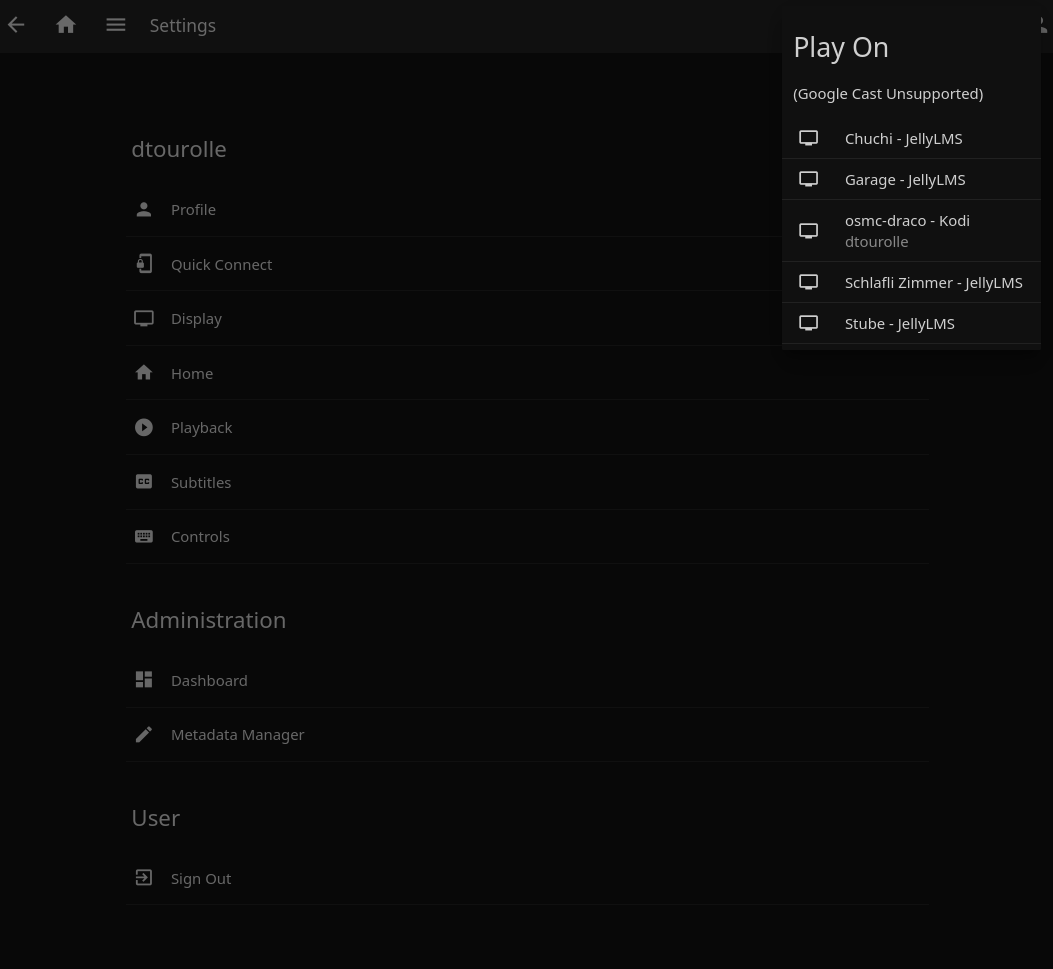
Cast to LMS Players
Select any LMS player directly from Jellyfin's "Play On" menu:
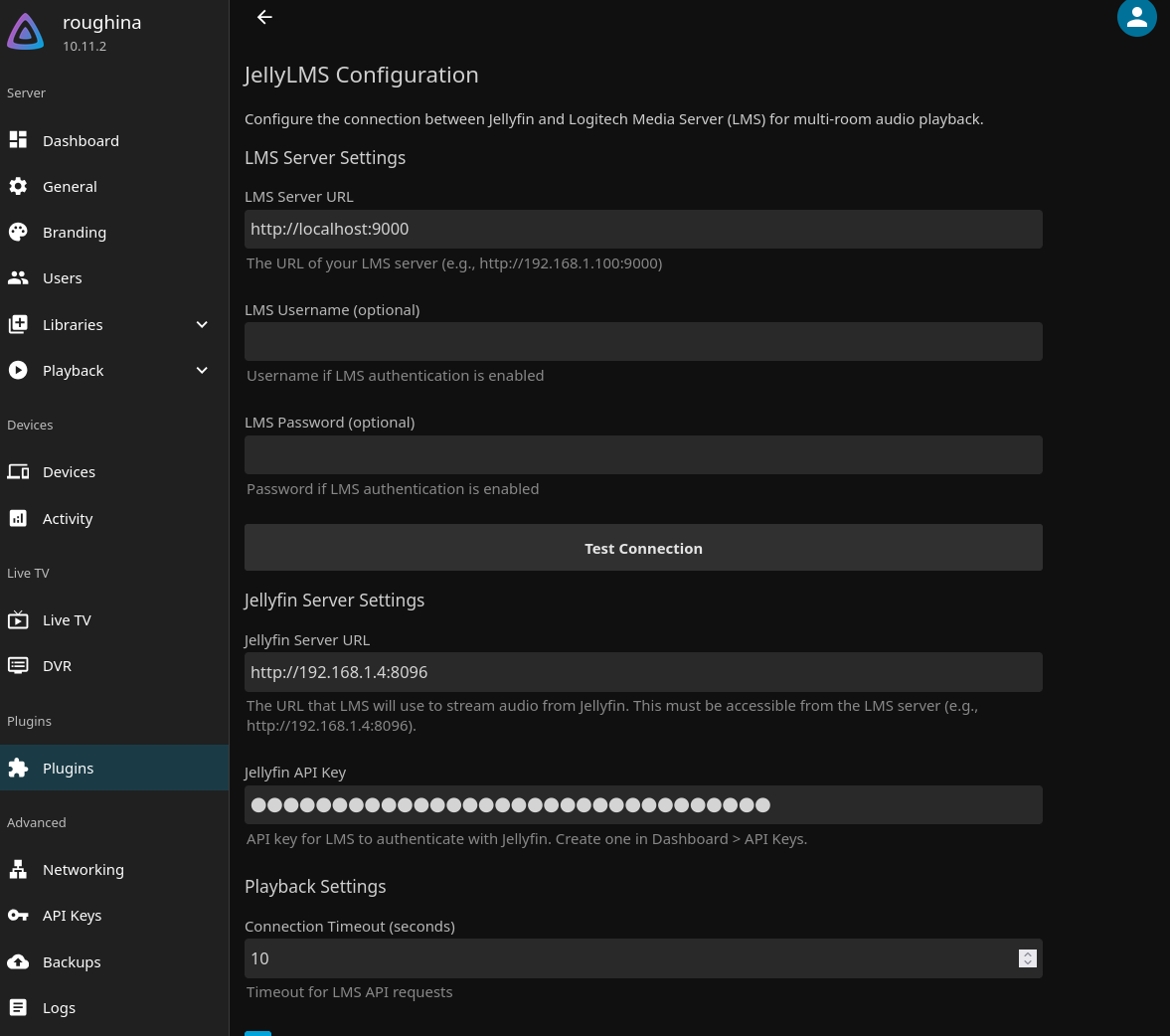
Plugin Configuration
Configure LMS and Jellyfin server connections:
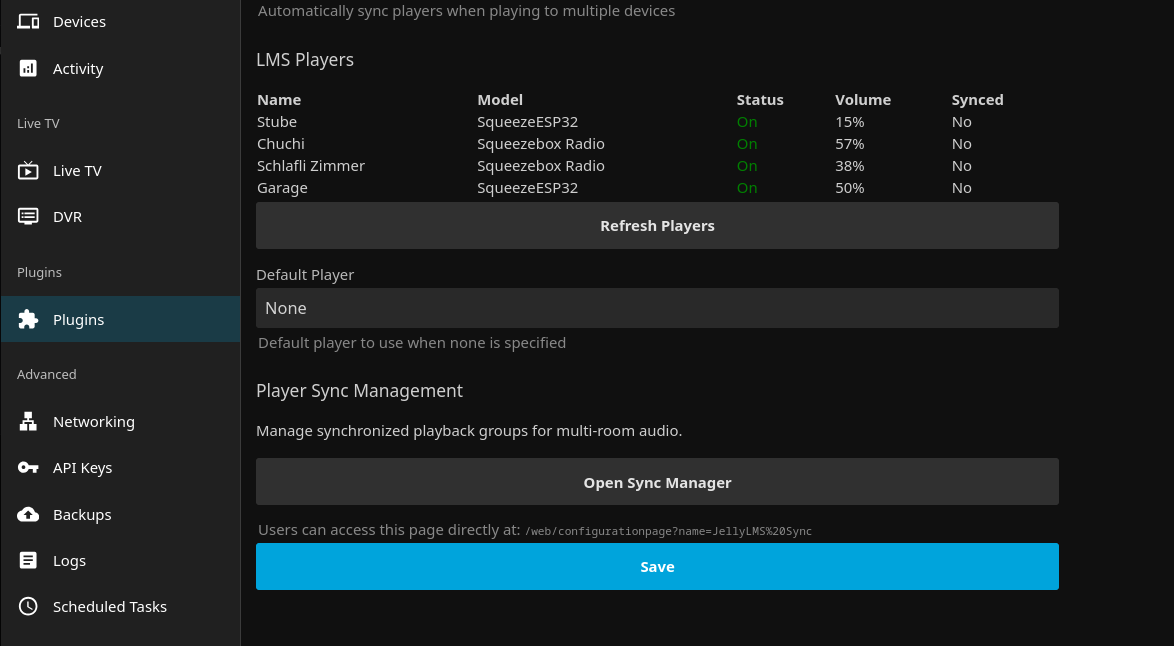
Player Discovery
View discovered LMS players with their status and volume levels:
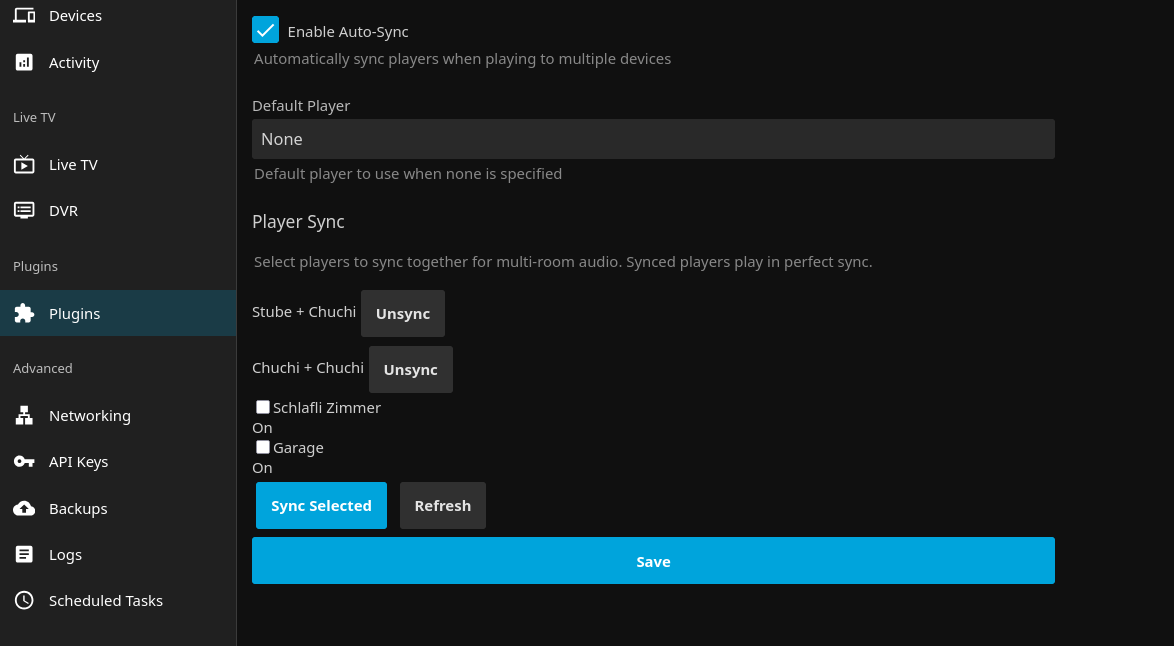
Sync Group Management
Create and manage synchronized playback groups for multi-room audio:
Requirements
- Jellyfin Server 10.10.0 or later
- .NET 9.0 Runtime
- Logitech Media Server (LMS) with JSON-RPC API enabled (default on port 9000)
Playback Architecture
JellyLMS uses Jellyfin's native "Play On" (cast) interface to control LMS players. When you select an LMS player from Jellyfin's cast menu, playback is managed through a robust state machine that ensures reliable operation.
State Machine
The playback controller uses a state machine to ensure proper sequencing of operations:
                    ┌────────┐
                    │  Idle  │  (device connected, no media)
                    └───┬────┘
                        │ Play command
                        ▼
                    ┌────────┐
              ┌────►│Loading │◄────┐
              │     └───┬────┘     │
              │         │          │ Seek (HTTP streaming
              │   LMS confirms     │ restarts stream)
              │   mode="play"      │
              │         ▼          │
┌───────┐     │     ┌────────┐     │
│ Error │◄────┼─────│Playing │─────┘
└───┬───┘     │     └───┬────┘
    │         │         │ Pause
  retry       │         ▼
    │         │     ┌────────┐
    └─────────┼─────│ Paused │
              │     └───┬────┘
              │         │ Seek (native LMS)
              │         ▼
              │     ┌────────┐
              └─────│Seeking │
                    └────────┘

From any state: Stop → Stopped
How Playback Works
- Cast Request: User selects an LMS player from Jellyfin's "Play On" menu
- Loading: Plugin sends play command to LMS and transitions to Loading state
- Confirmation: Plugin polls LMS until playback is confirmed (mode="play")
- Playing: Playback is active; progress is synced between Jellyfin and LMS
- Controls: Play, pause, seek, and volume commands are forwarded to LMS
Error Handling
The state machine includes automatic retry with exponential backoff:
- Timeout errors: Auto-retry up to 2 times (500ms → 1s delay)
- Network errors: Auto-retry up to 2 times
- LMS errors: No retry, transition to Error state
Installation
Manual Installation
- Download the latest release or build from source
- Copy
Jellyfin.Plugin.JellyLMS.dllto your Jellyfin plugins directory:- Linux:
~/.local/share/jellyfin/plugins/JellyLMS/ - Windows:
%APPDATA%\jellyfin\plugins\JellyLMS\ - Docker:
/config/plugins/JellyLMS/
- Linux:
- Restart Jellyfin
Building from Source
# Clone the repository
git clone https://gitea.tourolle.paris/dtourolle/jellyLMS.git
cd jellyLMS

# Build
dotnet build Jellyfin.Plugin.JellyLMS.sln -c Release

# The DLL will be in:
# Jellyfin.Plugin.JellyLMS/bin/Release/net9.0/
Configuration
- Navigate to Jellyfin Dashboard → Plugins → JellyLMS
- Configure the following settings:
| Setting | Description | Default |
|---|---|---|
| LMS Server URL | Full URL to your LMS server | http://localhost:9000 |
| Jellyfin Server URL | URL where LMS can reach Jellyfin | http://localhost:8096 |
| Connection Timeout | Timeout for LMS API calls (seconds) | 10 |
| Enable Auto Sync | Automatically sync players when creating groups | true |
| Default Player | MAC address of the default player | (none) |
| Use Direct File Path | Enable direct file access instead of HTTP streaming | false |
Advanced Settings (State Machine)
| Setting | Description | Default |
|---|---|---|
| Loading Timeout | Max time to wait for LMS to start playback (seconds) | 5 |
| Seek Timeout | Max time to wait for seek to complete (seconds) | 3 |
| Transition Poll Interval | How often to poll LMS during state transitions (ms) | 300 |
| Max Auto Retries | Number of automatic retries for transient failures | 2 |
- Click "Test Connection" to verify connectivity to LMS
- Use "Discover Players" to see available LMS players
API Endpoints
The plugin exposes REST API endpoints under /JellyLms/ for player and sync group management.
Note: Playback control (play, pause, seek, volume) is handled through Jellyfin's native "Play On" (cast) interface, not through REST endpoints.
Players
GET /JellyLms/Players- List all LMS playersGET /JellyLms/Players/{mac}- Get specific player detailsPOST /JellyLms/Players/{mac}/PowerOn- Power on a playerPOST /JellyLms/Players/{mac}/PowerOff- Power off a playerPOST /JellyLms/Players/{mac}/Volume- Set player volume
Sync Groups
GET /JellyLms/SyncGroups- List all sync groupsPOST /JellyLms/SyncGroups- Create a new sync groupDELETE /JellyLms/SyncGroups/{masterMac}- Dissolve a sync groupDELETE /JellyLms/SyncGroups/Players/{mac}- Remove player from its sync group
Utilities
POST /JellyLms/TestConnection- Test LMS connectivityGET /JellyLms/DiscoverPaths- Discover file paths for direct file access configuration
LMS Setup
Ensure your LMS server has the JSON-RPC API available. This is enabled by default and accessible at:
http://<lms-server>:9000/jsonrpc.js
The plugin communicates with LMS using the slim.request JSON-RPC method.
Troubleshooting
Cannot connect to LMS
- Verify LMS is running and accessible at the configured URL
- Check that the JSON-RPC endpoint responds:
curl http://localhost:9000/jsonrpc.js - Ensure no firewall is blocking connections between Jellyfin and LMS
Players not appearing
- Ensure players are powered on and connected to LMS
- Click "Discover Players" to refresh the player list
- Check LMS web interface to verify players are visible there
Audio not playing
- Verify Jellyfin server URL is accessible from LMS server
- Check that audio files are in a format supported by your LMS players
- Ensure players are powered on (plugin can auto-power-on if configured)
Known Limitations
Seeking with HTTP Streaming
When using HTTP streaming (the default), LMS cannot seek within audio streams. To work around this, when you seek or cast from a specific position, JellyLMS restarts playback with a new transcoded stream that begins at the requested position. This means:
- Seeking triggers a brief audio restart rather than a smooth jump
- Starting playback mid-track uses transcoding (MP3 320kbps) instead of direct streaming
- Playback from the beginning uses direct/static streaming for best quality
This is a fundamental limitation of how LMS handles HTTP streams.
Solution: Direct File Access
If your Jellyfin and LMS servers can both access the same storage (e.g., a NAS), you can enable Direct File Access mode in the plugin settings. This allows LMS to read files directly from disk, enabling:
- Native smooth seeking - no audio restart when scrubbing
- Full quality playback - no transcoding needed
- Better performance - no HTTP overhead
To configure, set the path mappings in the plugin settings:
- Jellyfin Media Path: The path prefix as Jellyfin sees your library (e.g.,
/media/music) - LMS Media Path: The same location as LMS sees it (e.g.,
/mnt/musicor//nas/music)
Development
Project Structure
Jellyfin.Plugin.JellyLMS/
├── Plugin.cs                    # Main plugin entry point
├── PluginServiceRegistrator.cs  # DI service registration
├── Configuration/
│   ├── PluginConfiguration.cs   # Plugin settings
│   └── configPage.html          # Dashboard configuration UI
├── Api/
│   └── JellyLmsController.cs    # REST API endpoints (players, sync groups)
├── Services/
│   ├── ILmsApiClient.cs         # LMS API interface
│   ├── LmsApiClient.cs          # LMS JSON-RPC client
│   ├── LmsPlayerManager.cs      # Player discovery & sync
│   ├── LmsSessionController.cs  # Playback control (ISessionController)
│   ├── PlaybackStateMachine.cs  # State machine for playback lifecycle
│   └── LmsStatusPoller.cs       # Polls LMS to confirm state transitions
└── Models/
    ├── LmsPlayer.cs             # Player model
    ├── LmsPlaybackSession.cs    # Session state (incl. PlaybackState enum)
    └── LmsApiModels.cs          # JSON-RPC DTOs
Building for Development
# Build in debug mode
dotnet build Jellyfin.Plugin.JellyLMS.sln

# Copy to Jellyfin plugins directory
cp Jellyfin.Plugin.JellyLMS/bin/Debug/net9.0/Jellyfin.Plugin.JellyLMS.dll \
   ~/.local/share/jellyfin/plugins/JellyLMS/

# Restart Jellyfin to load the plugin
License
This plugin is licensed under the GPLv3. See LICENSE for details.
Due to how Jellyfin plugins work, when compiled into a binary, it links against Jellyfin's GPLv3-licensed NuGet packages, making the resulting binary GPLv3 licensed.
Contributing
Contributions are welcome! Please open an issue or submit a pull request.
Acknowledgments
- Jellyfin - The Free Software Media System
- Logitech Media Server - Open source server for Squeezebox players