 dtourolle
d4248bc0dd
dtourolle
d4248bc0dd
The learned demosaic replaces the classical one and takes its input, the
mosaic hot_pixels.wgsl leaves (denoise.md §2), so its training data and its
input in the app must come through that pass and not a lookalike. The pass
was recorded inline in Demosaicer::run; it is now built by hot_pass and
recorded by record_hot_pass, which run still uses unchanged, and
Demosaicer::repair_hot_pixels runs it on its own and reads the mosaic back.

mosaic_dump moves to dr-gpu to call it, records how many photosites changed,
and keeps --unrepaired for a raw readout.
DarkRoom
A non-destructive RAW photo editor and library for Linux and Android, with a GPU develop pipeline, a catalog that syncs between devices, and no account, no telemetry and no cloud of its own.

The manual shows every feature, pictured from the application itself. This page says what it is, how to get it, and what is still missing.
What it does
A library. Point it at a folder — on this machine, on a network mount, or one a Nextcloud client keeps in virtual-files mode, where a placeholder is treated as the photograph rather than as a one-byte file — or at a Nextcloud account directly; a photograph that is only on the server opens on its thumbnail with the download's progress over it. The grid is virtualised, ordered by capture time with a timeline beside it, and filtered by rating, flag, colour label, person and whether the file is here. Ratings, colour labels, keywords, collections and a trash that survives a crash mid-operation. Card ingest. Bursts fold. The same RAW catalogued twice — a dated folder and a backup beside it — is found, proved the same, and folded onto one copy with the spares in the trash. Face detection and identity, with the index syncing between devices.
Developing. Nineteen declared operations, those that read one pixel
fused into a generated shader rather than run a pass each, plus the
neighbourhood work that cannot be: clarity, texture, dehaze, capture
sharpening, noise reduction, lens correction. Every edit works on the scene
as the camera recorded it — linear, highlights beyond white included — and
one Tone Mapping step, last, after sharpening and noise reduction, fits it
to the screen, with a contrast and a white point of its own; a spectral film
stock takes its place when one is chosen. Crop, straighten and correct
converging verticals, spot repair, and local adjustments over masks the
model draws — click a subject or a category, then paint, subtract a gradient
or keep only where two selections agree, grow or shrink the edge. A mask's
sliders add to the photograph's, the film's among them, so a sky can be
burned in on the print as a darkroom printer would. Hot and dead photosites
are mended before the demosaic, with nothing to set. Focus peaking and a raw
histogram for judging what is recoverable. Presets, a click away in a menu
at the foot of the tool rail, with a collection shipped in the application —
everyday corrections, and a look for each measured colour, cinema and
black-and-white stock — and Lightroom presets imported as looks that leave a
photograph's own corrections alone. XMP sidecars other editors read. A
linear DNG larger than one GPU texture — a stitched panorama twenty thousand
pixels wide — opens, develops and exports at full size.

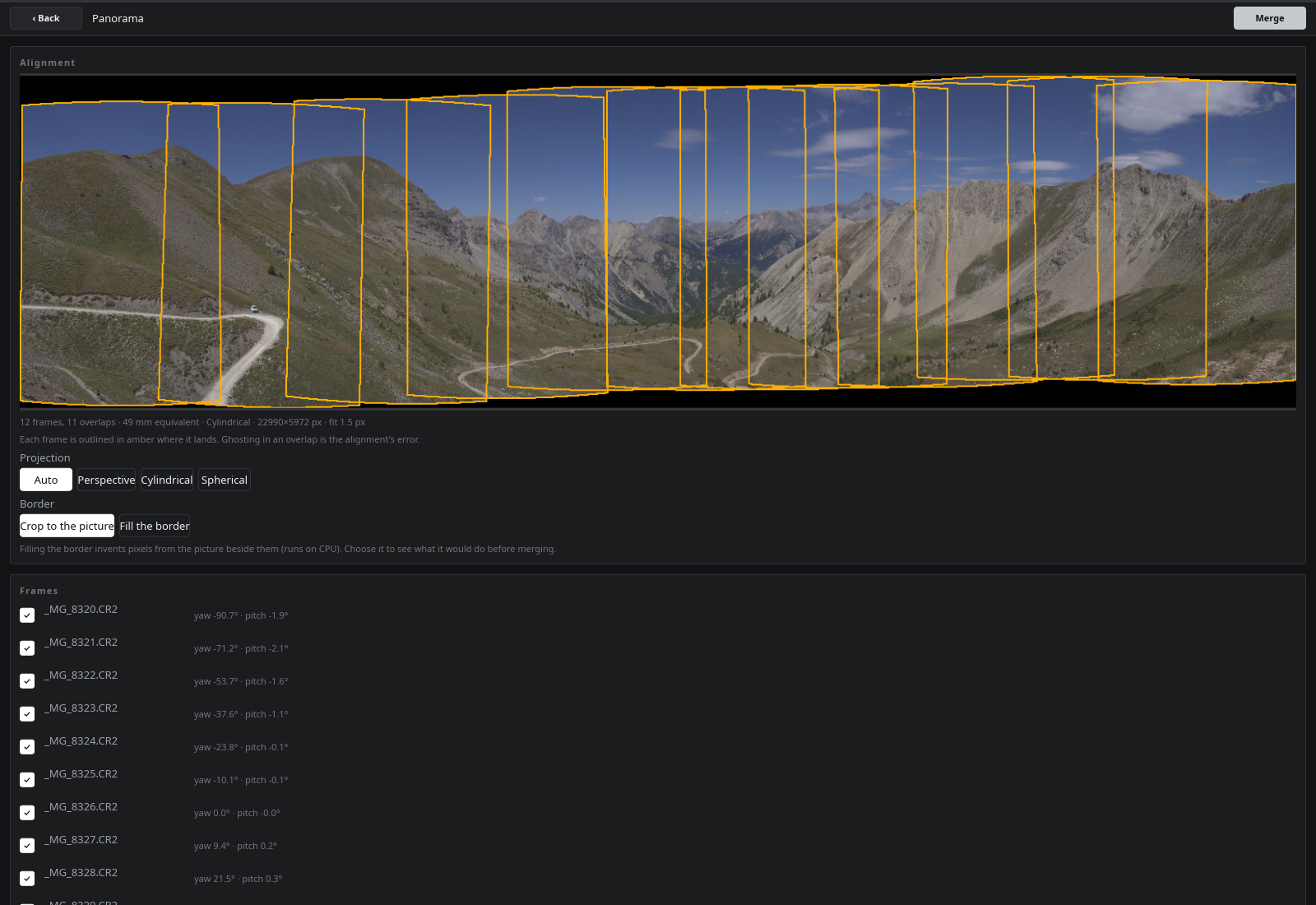
Panoramas. Select the frames, align, untick any frame to leave it out and the rest re-align at once, choose a projection, fill the ragged border rather than crop it, and the composite lands beside its sources as a DNG, with a sidecar recording what it was merged from.
From the keyboard, and with its manual. Rating, flagging and labelling
have keys in the grid and in develop, as do zoom, undo and stepping through a
shoot in develop, and none of them is keyboard-only. The help sheet (F1, or
? in develop) lists every key and gesture, generated from the code that
binds it, and links them to the sections of the manual that show them — the
manual ships with the application and opens offline.
Export. JPEG, PNG, AVIF, JPEG XL, 8- and 16-bit TIFF, with resize, output sharpening, a naming template and a colour space — into albums: named export folders on this machine or on the server, never inside the library, which remember the photograph behind each file and sync between devices as collections do.
On both platforms. The same core runs on a desktop and a 12-inch tablet; the interface is one layout, tuned for a wide viewport with touch targets throughout. On both, the develop view draws the compute pass's texture directly — no readback between the GPU and the screen.
Getting it
| Platform | How | State |
|---|---|---|
| Arch Linux | packaging/PKGBUILD — makepkg -si |
Built from every release |
| Android | The APK from each CI run, or ./docker/android/package.sh --install |
Runs on a tablet; F-Droid not yet submitted |
| Windows | DarkRoom-<version>-x86_64-setup.exe, cross-built by CI (windows.md) |
Verified under Wine only; unsigned |
| Flatpak | packaging/flatpak/ |
Manifest in tree; folders are chosen through the portal, but no Flatpak has been built to prove it |
Building from source
Before anything. Git LFS holds the model weights and the manual's
pictures; a clone without it has ~130-byte pointers in their place, and every
packager below refuses to ship one. The Rust toolchain pins itself to 1.92.0
through rust-toolchain.toml, so rustup is all you install. Slint needs a few
system headers, and the app needs a Vulkan driver at runtime:
git clone https://gitea.tourolle.paris/dtourolle/DarkRoom.git && cd DarkRoom
git lfs install && git lfs pull

# Debian / Ubuntu
sudo apt-get install pkg-config libfontconfig1-dev libxkbcommon-dev libvulkan1
# Arch
sudo pacman -S --needed pkgconf fontconfig libxkbcommon vulkan-icd-loader
To try it from the checkout, without installing anything:
cargo run --release -p darkroom-desktop
This is for development. The binary under target/ finds no face, scene or
panorama-fill models, and a release build does not find the manual either:
it looks for all of them in the system data directories an install creates
($XDG_DATA_DIRS/darkroom, by default /usr/local/share/darkroom and
/usr/share/darkroom), never in the checkout. Those features show as
unavailable until it is installed.
Linux: build and install
On Arch, build a package from the checkout and install it with pacman, so it can be upgraded and removed like any other:
cd packaging && makepkg -si
Elsewhere, build the release binary and install it under /usr/local
by hand. These are the same files, in the same places, as the Arch package
(packaging/PKGBUILD's package() is the reference):
cargo build --release --locked -p darkroom-desktop
# -> target/release/darkroom-desktop

P=/usr/local
sudo install -Dm755 target/release/darkroom-desktop $P/bin/darkroom-desktop

# The models: faces and eye state, scene categories, panorama border fill
sudo install -d $P/share/darkroom/models
sudo install -m644 models/face/*.onnx models/scene/* models/inpaint/*.onnx \
    $P/share/darkroom/models/

# The offline manual the Help menu opens
sudo install -Dm644 docs/manual/index.html $P/share/darkroom/manual/index.html
sudo install -Dm644 -t $P/share/darkroom/manual/media docs/manual/media/*

# Launcher entry, icon and software-centre description
sudo install -Dm644 packaging/paris.tourolle.darkroom.desktop \
    $P/share/applications/paris.tourolle.darkroom.desktop
sudo install -Dm644 ui/dr-ui/ui/app-icon.png \
    $P/share/icons/hicolor/256x256/apps/paris.tourolle.darkroom.png
sudo install -Dm644 packaging/paris.tourolle.darkroom.metainfo.xml \
    $P/share/metainfo/paris.tourolle.darkroom.metainfo.xml
Then run darkroom-desktop, or open it from the application menu. To
uninstall, remove those files and /usr/local/share/darkroom. Your catalog,
settings and thumbnails live in darkroom/ under your own XDG data, config
and cache directories (~/.local/share, ~/.config, ~/.cache) and are
not touched by either.
Optional at runtime: gnome-keyring or kwallet to remember Nextcloud
credentials, and an ONNX Runtime in /usr/lib (CPU, or ROCm on an AMD GPU) to
run the models on every core rather than on the built-in engine.
Windows: build the installer
The .exe is cross-built from Linux in a container (podman or docker), with
no Windows machine involved. Two steps — the executable, then the NSIS
installer that carries it with its models and manual:
./docker/windows/build.sh cargo build --release --target x86_64-pc-windows-gnu -p darkroom-desktop
./docker/windows/build.sh docker/windows/package.sh
Both land in the container's cache on the host, ~/.cache/darkroom-windows/target/:
the bare executable under x86_64-pc-windows-gnu/release/darkroom-desktop.exe,
the installer under installer/DarkRoom-<version>-x86_64-setup.exe.
Copy that to the Windows machine and run it — it installs per user, needs no
administrator rights, and adds an uninstaller. Run on its own, the bare
.exe looks for models\ and manual\ beside itself, so use the installer.
docker/windows has the details.
Android: build the APK
Also containerised (docker/android). This
builds, packages and debug-signs the APK, and with --install puts it on a
device connected over adb:
./docker/android/package.sh --install
A debug-signed APK cannot replace one installed from a release; uninstall that first.
CONTRIBUTING.md has the four commands CI runs against what you send, and the shortest useful contribution — a develop operation is one YAML file, and it arrives with its controls, its place in the chain and its tests.
Where it stands
0.20.0, thirty-four tagged releases in. 193 numbered requirements in scope, 85% of them claimed by code and traced to it; the rest are written down rather than merely absent.
Not built: plugins (post-v1, D12), compare and survey culling, AI denoise, tiled rendering beyond the export of an oversized DNG, HDR merge and focus stacking, importing a Lightroom or darktable catalog, translations beyond the launch screen, most of the Android platform integration beyond running, and a Flatpak actually built and run in its sandbox. The performance targets are half verified: the per-commit benchmark suite §8 requires exists for everything that does not need a frame — the catalog, the scan, the thumbnails — and not yet for the render path, so a regression there fails nothing. outstanding.md is the list, with the reasoning for each.
Documentation
docs/README.md is the index. The short version, for someone using it:
| manual | Every feature, pictured |
| gestures.md | How it is driven — generated from the code, so it cannot describe a gesture that does not exist |
For someone changing it:
| CONTRIBUTING.md | How to land a first change without reading the rest |
| requirements.md | What the software must do — the numbered register, and the decisions |
| architecture.md | How it is built — crates, the GPU pipeline, the data model, sync |
| technical-debt.md | Compromises taken deliberately, each with the condition that retires it |
| outstanding.md | What is not built, and whether that is a decision or a gap |
| code-health.md | What a contribution costs, per seam, measured |
| traceability.md | Generated: which requirement is claimed by which file |
Designs, one per subsystem: segmentation and mask editing · spot removal · panorama · faces · inference · storage and sync · catalog · display and extension · navigation · distribution · windows · benchmarks.
Licence
GPL-3.0-or-later. The photographs in the manual and the test fixtures are the author's and are there to show and test this project, nothing else. The model weights carry their own licences — models/LICENCE.md.