
10 KiB
JellyLMS
A Jellyfin plugin that bridges audio playback to Logitech Media Server (LMS) for multi-room synchronized playback.
Quick Install
Add the following repository URL to your Jellyfin server to install JellyLMS directly from the plugin catalog:
https://gitea.tourolle.paris/dtourolle/jellyLMS/raw/branch/master/manifest.json
Steps:
- Go to Dashboard → Plugins → Repositories
- Click Add and paste the URL above
- Go to Catalog and find "JellyLMS"
- Click Install and restart Jellyfin
Overview
JellyLMS enables Jellyfin to stream audio to LMS, which acts as a multi-room speaker system. The architecture is:
- Jellyfin owns the library, queue, and playback intent
- LMS owns synchronized audio delivery to players (Squeezebox, piCorePlayer, etc.)
┌─────────────────┐         ┌─────────────────┐         ┌─────────────────┐
│    Jellyfin     │         │    JellyLMS     │         │      LMS        │
│                 │         │    Plugin       │         │                 │
│  ┌───────────┐  │         │                 │         │  ┌───────────┐  │
│  │  Library  │──┼────────►│  LmsApiClient   │────────►│  │  Players  │  │
│  │  (Audio)  │  │         │                 │         │  │  (Zones)  │  │
│  └───────────┘  │         │  ┌───────────┐  │         │  └───────────┘  │
│                 │         │  │ Session   │  │         │                 │
│  ┌───────────┐  │         │  │ Manager   │  │         │  ┌───────────┐  │
│  │   Queue   │──┼────────►│  └───────────┘  │────────►│  │  Sync     │  │
│  │           │  │         │                 │         │  │  Groups   │  │
│  └───────────┘  │         │  ┌───────────┐  │         │  └───────────┘  │
│                 │         │  │ REST API  │  │         │                 │
│  ┌───────────┐  │         │  │Controller │  │         │                 │
│  │ Playback  │──┼────────►│  └───────────┘  │         │                 │
│  │ Controls  │  │         │                 │         │                 │
│  └───────────┘  │         └─────────────────┘         └─────────────────┘
└─────────────────┘
Features
- Player Discovery: Automatically discovers all LMS players/zones
- Multi-Room Sync: Create and manage sync groups for synchronized playback across multiple rooms
- Playback Control: Play, pause, stop, seek, and volume control forwarded to LMS
- Stream Bridging: Generates audio stream URLs from Jellyfin for LMS to consume
Screenshots
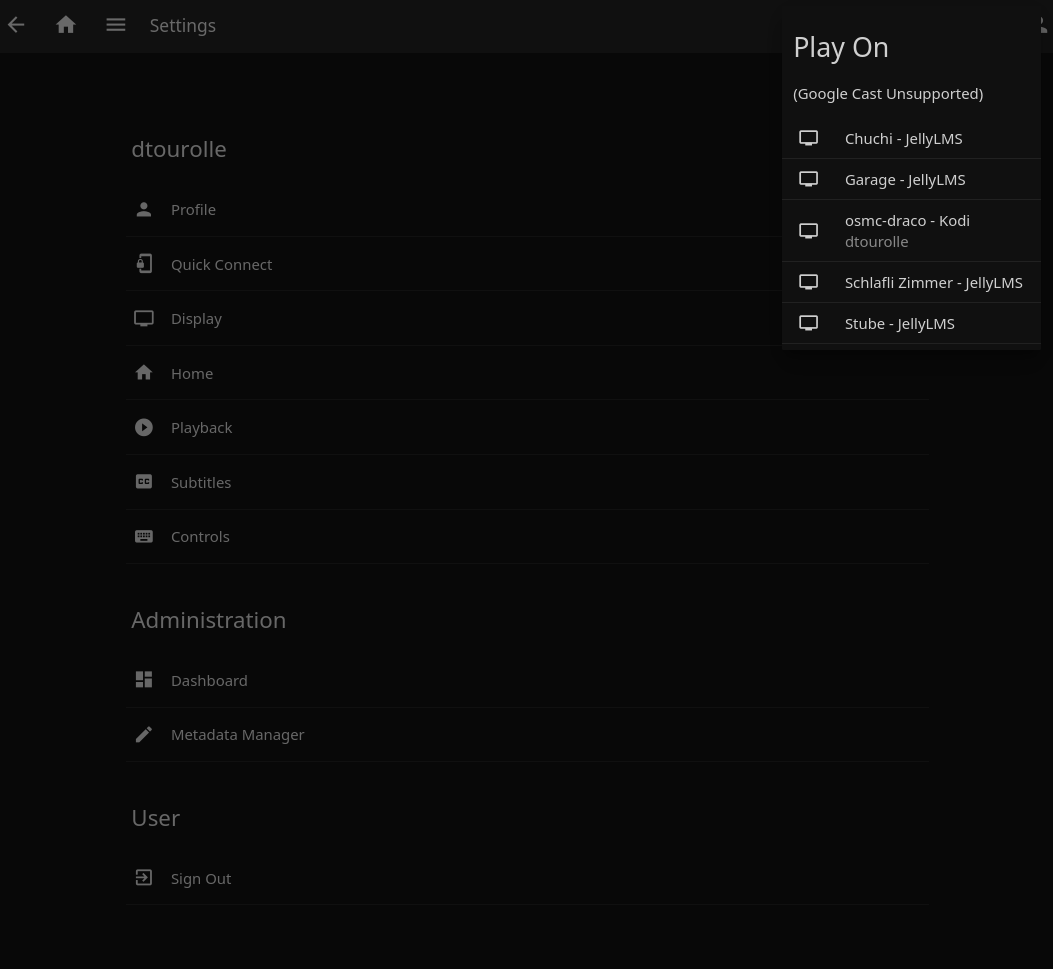
Cast to LMS Players
Select any LMS player directly from Jellyfin's "Play On" menu:
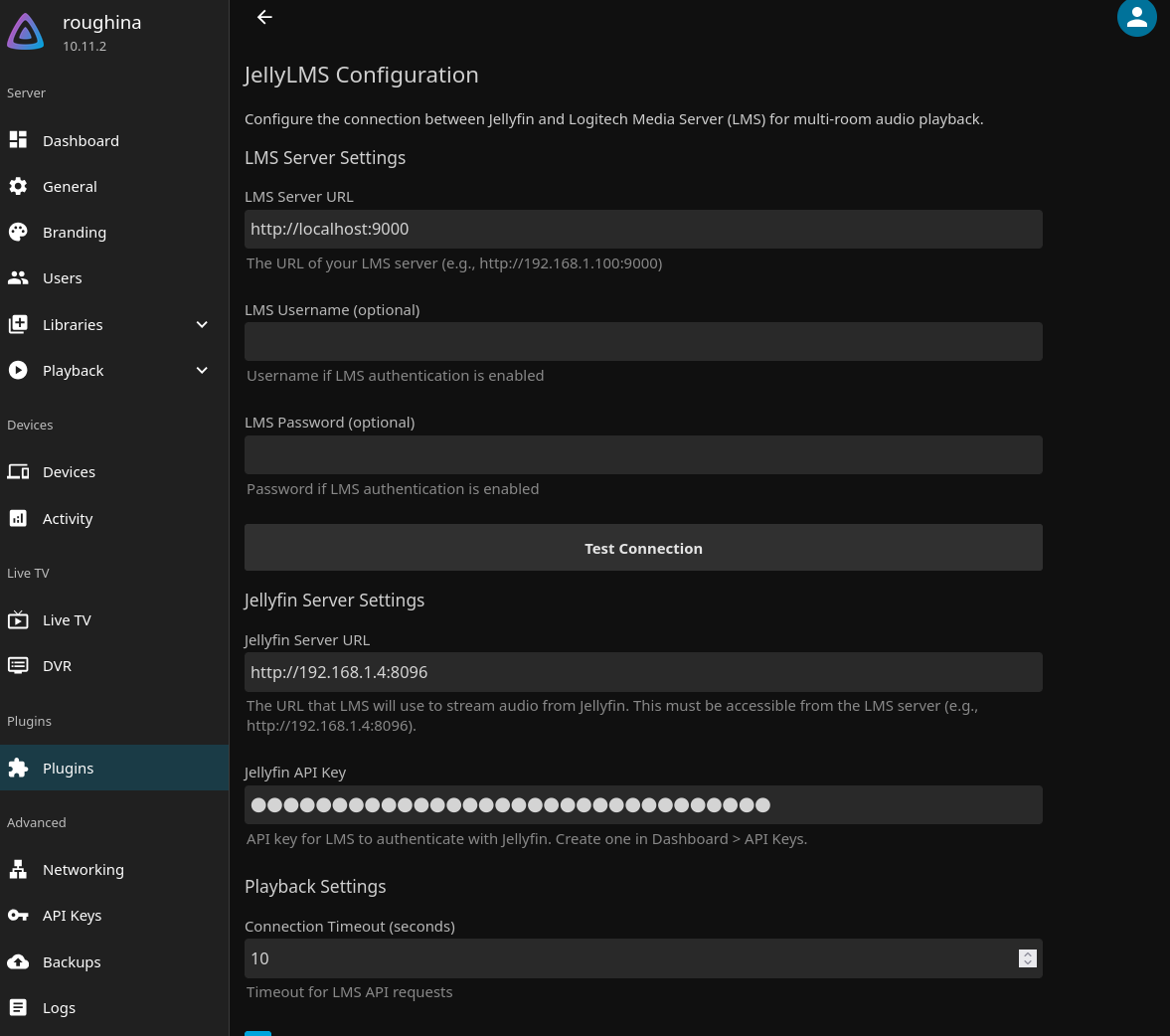
Plugin Configuration
Configure LMS and Jellyfin server connections:
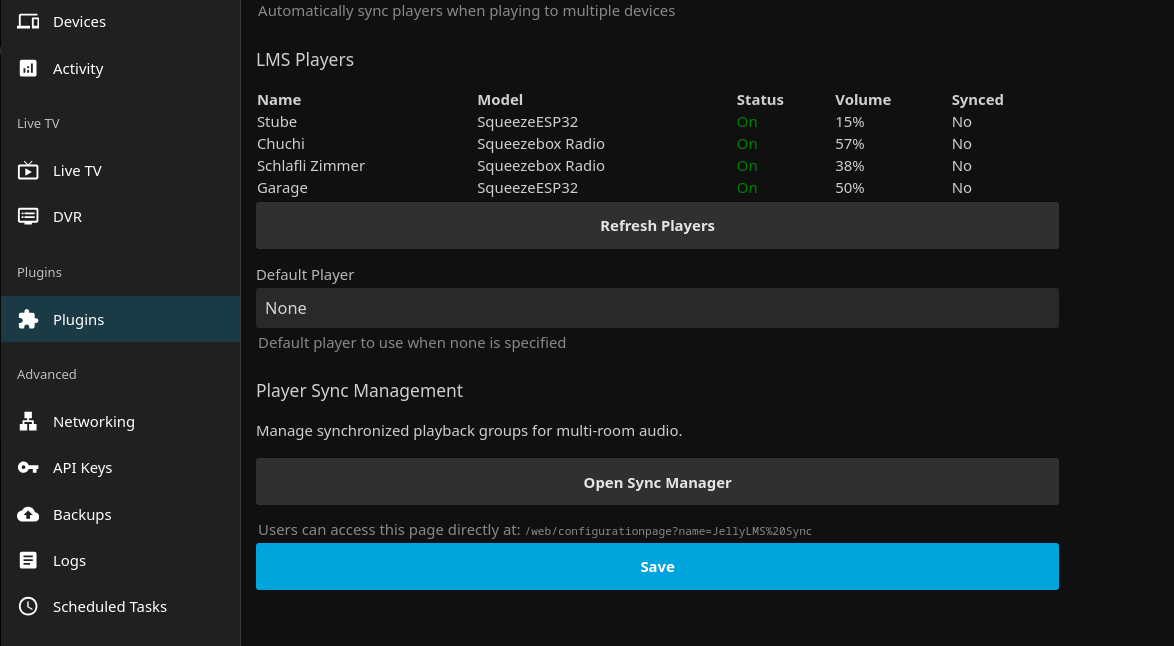
Player Discovery
View discovered LMS players with their status and volume levels:
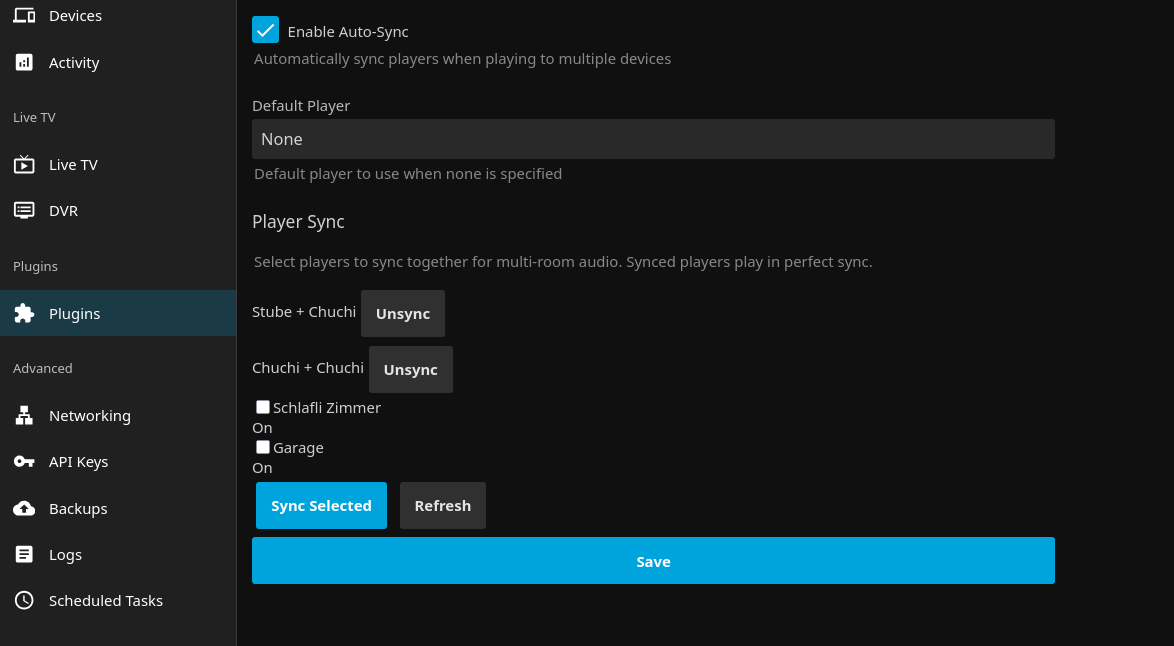
Sync Group Management
Create and manage synchronized playback groups for multi-room audio:
Requirements
- Jellyfin Server 10.10.0 or later
- .NET 8.0 Runtime
- Logitech Media Server (LMS) with JSON-RPC API enabled (default on port 9000)
Installation
Manual Installation
- Download the latest release or build from source
- Copy
Jellyfin.Plugin.JellyLMS.dllto your Jellyfin plugins directory:- Linux:
~/.local/share/jellyfin/plugins/JellyLMS/ - Windows:
%APPDATA%\jellyfin\plugins\JellyLMS\ - Docker:
/config/plugins/JellyLMS/
- Linux:
- Restart Jellyfin
Building from Source
# Clone the repository
git clone https://gitea.tourolle.paris/dtourolle/jellyLMS.git
cd jellyLMS

# Build
dotnet build Jellyfin.Plugin.JellyLMS.sln -c Release

# The DLL will be in:
# Jellyfin.Plugin.JellyLMS/bin/Release/net8.0/
Configuration
- Navigate to Jellyfin Dashboard → Plugins → JellyLMS
- Configure the following settings:
| Setting | Description | Default |
|---|---|---|
| LMS Server URL | Full URL to your LMS server | http://localhost:9000 |
| Jellyfin Server URL | URL where LMS can reach Jellyfin | http://localhost:8096 |
| Connection Timeout | Timeout for LMS API calls (seconds) | 10 |
| Enable Auto Sync | Automatically sync players when creating groups | true |
| Default Player | MAC address of the default player | (none) |
- Click "Test Connection" to verify connectivity to LMS
- Use "Discover Players" to see available LMS players
API Endpoints
The plugin exposes REST API endpoints under /JellyLms/:
Players
GET /JellyLms/Players- List all LMS playersGET /JellyLms/Players/{mac}- Get specific player detailsPOST /JellyLms/Players/Refresh- Refresh player list from LMS
Sync Groups
GET /JellyLms/SyncGroups- List all sync groupsPOST /JellyLms/SyncGroups- Create a new sync groupDELETE /JellyLms/SyncGroups/{masterMac}- Dissolve a sync groupDELETE /JellyLms/SyncGroups/{masterMac}/Players/{slaveMac}- Remove player from group
Sessions
GET /JellyLms/Sessions- List active playback sessionsPOST /JellyLms/Sessions- Start a new playback sessionPOST /JellyLms/Sessions/{id}/Pause- Pause playbackPOST /JellyLms/Sessions/{id}/Resume- Resume playbackPOST /JellyLms/Sessions/{id}/Stop- Stop playbackPOST /JellyLms/Sessions/{id}/Seek- Seek to positionPOST /JellyLms/Sessions/{id}/Volume- Set volume
Status
GET /JellyLms/Status- Get LMS connection statusPOST /JellyLms/TestConnection- Test LMS connectivity
LMS Setup
Ensure your LMS server has the JSON-RPC API available. This is enabled by default and accessible at:
http://<lms-server>:9000/jsonrpc.js
The plugin communicates with LMS using the slim.request JSON-RPC method.
Troubleshooting
Cannot connect to LMS
- Verify LMS is running and accessible at the configured URL
- Check that the JSON-RPC endpoint responds:
curl http://localhost:9000/jsonrpc.js - Ensure no firewall is blocking connections between Jellyfin and LMS
Players not appearing
- Ensure players are powered on and connected to LMS
- Click "Discover Players" to refresh the player list
- Check LMS web interface to verify players are visible there
Audio not playing
- Verify Jellyfin server URL is accessible from LMS server
- Check that audio files are in a format supported by your LMS players
- Ensure players are powered on (plugin can auto-power-on if configured)
Known Limitations
Seeking with HTTP Streaming
When using HTTP streaming (the default), LMS cannot seek within audio streams. To work around this, when you seek or cast from a specific position, JellyLMS restarts playback with a new transcoded stream that begins at the requested position. This means:
- Seeking triggers a brief audio restart rather than a smooth jump
- Starting playback mid-track uses transcoding (MP3 320kbps) instead of direct streaming
- Playback from the beginning uses direct/static streaming for best quality
This is a fundamental limitation of how LMS handles HTTP streams.
Solution: Direct File Access
If your Jellyfin and LMS servers can both access the same storage (e.g., a NAS), you can enable Direct File Access mode in the plugin settings. This allows LMS to read files directly from disk, enabling:
- Native smooth seeking - no audio restart when scrubbing
- Full quality playback - no transcoding needed
- Better performance - no HTTP overhead
To configure, set the path mappings in the plugin settings:
- Jellyfin Media Path: The path prefix as Jellyfin sees your library (e.g.,
/media/music) - LMS Media Path: The same location as LMS sees it (e.g.,
/mnt/musicor//nas/music)
Development
Project Structure
Jellyfin.Plugin.JellyLMS/
├── Plugin.cs                    # Main plugin entry point
├── PluginServiceRegistrator.cs  # DI service registration
├── Configuration/
│   ├── PluginConfiguration.cs   # Plugin settings
│   └── configPage.html          # Dashboard configuration UI
├── Api/
│   └── JellyLmsController.cs    # REST API endpoints
├── Services/
│   ├── ILmsApiClient.cs         # LMS API interface
│   ├── LmsApiClient.cs          # LMS JSON-RPC client
│   ├── LmsPlayerManager.cs      # Player discovery & sync
│   └── LmsSessionManager.cs     # Playback session management
└── Models/
    ├── LmsPlayer.cs             # Player model
    ├── LmsPlaybackSession.cs    # Session state model
    └── LmsApiModels.cs          # JSON-RPC DTOs
Building for Development
# Build in debug mode
dotnet build Jellyfin.Plugin.JellyLMS.sln

# Copy to Jellyfin plugins directory
cp Jellyfin.Plugin.JellyLMS/bin/Debug/net8.0/Jellyfin.Plugin.JellyLMS.dll \
   ~/.local/share/jellyfin/plugins/JellyLMS/

# Restart Jellyfin to load the plugin
License
This plugin is licensed under the GPLv3. See LICENSE for details.
Due to how Jellyfin plugins work, when compiled into a binary, it links against Jellyfin's GPLv3-licensed NuGet packages, making the resulting binary GPLv3 licensed.
Contributing
Contributions are welcome! Please open an issue or submit a pull request.
Acknowledgments
- Jellyfin - The Free Software Media System
- Logitech Media Server - Open source server for Squeezebox players